Products

TCS Mobile Robot Scheduling System

Connects robot management, route management and task scheduling to coordinate multiple robots.

Talk to an expert
TCS System Architecture

Enterprise management

  • WMS
  • ERP
  • MES
  • Digital twins

Data exchange

  • Data API
  • Business API
  • Scheduling API

Integrated scheduling

  • Tasks
  • Robots
  • Maps
  • Stations
  • Traffic control
  • Automatic charging

Equipment execution

  • Mobile manipulators
  • Peripheral equipment

TCS Mobile Robot Scheduling System

The JINSYS Traffic Control System (TCS) integrates intelligent robots and factory automation equipment for coordinated operation and scheduling. Efficient global collaborative planning algorithms handle multi-robot pathfinding and traffic control to avoid congestion and prevent and resolve deadlocks.

The system consists of an interactive interface and a backend scheduling service. Robot, map and station management through the interface is automatically synchronized with the scheduling service.
System architecture

TCS System Architecture

Enterprise management

  • WMS
  • ERP
  • MES
  • Digital twins

Data exchange

  • Data API
  • Business API
  • Scheduling API

Integrated scheduling

  • Tasks
  • Robots
  • Maps
  • Stations
  • Traffic control
  • Automatic charging

Equipment execution

  • Mobile manipulators
  • Peripheral equipment
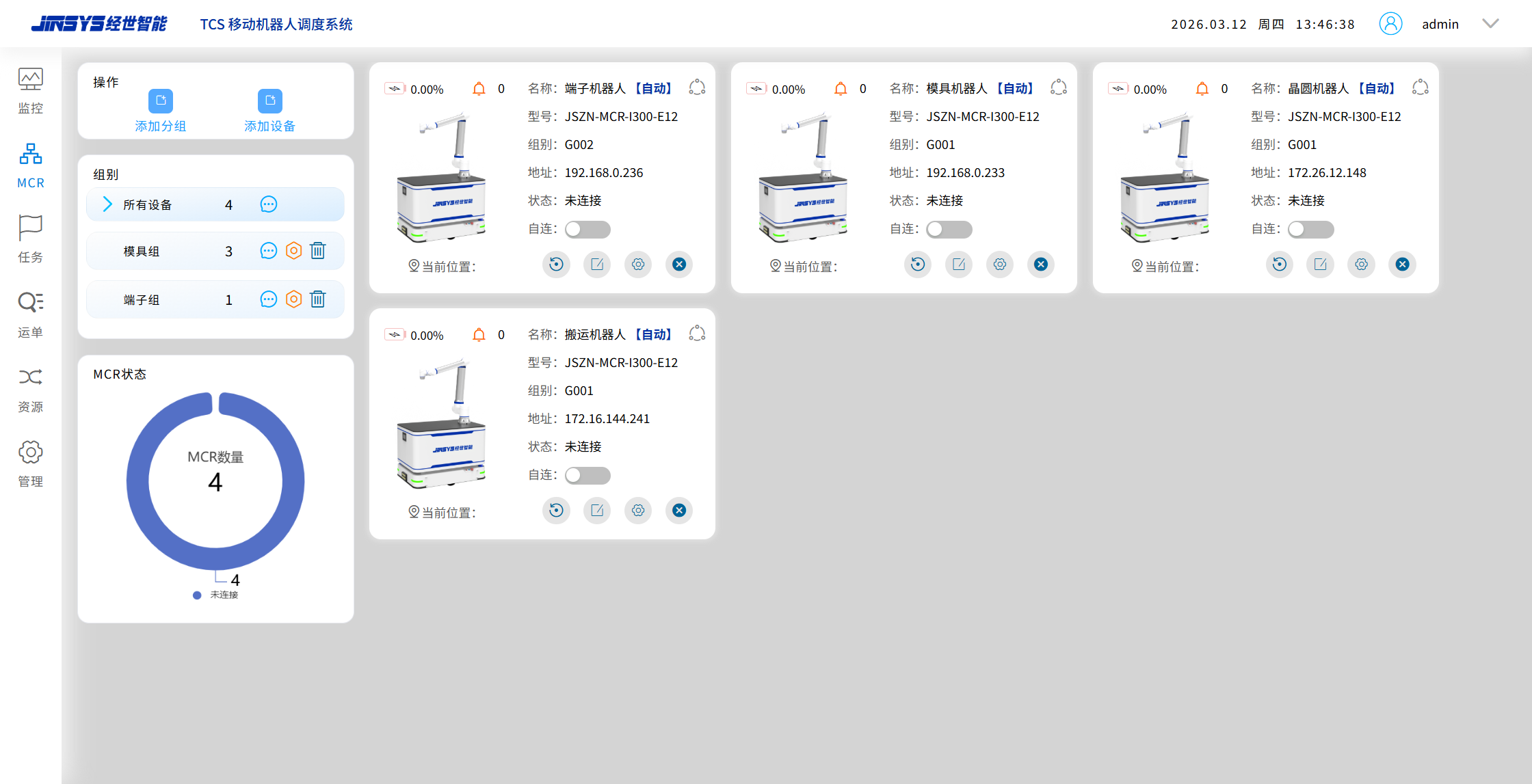
  • TCS — Robot Management

    Fleet groups

    • All robots: 4
    • Mold group: 3
    • Terminal group: 1
    • Add group
    • Add device

    Robot records

    • Terminal robot
    • Mold robot
    • Wafer robot
    • Transport robot
    • Model: JSZN-MCR-I300-E12

    Robot status

    • Connection
    • Automatic mode
    • Location
    • Battery
    • Alerts
    • Groups G001 / G002

    Workspace

    • Monitoring
    • MCR management
    • Tasks
    • Waybills
    • Resources
    • System management
    View original interfaceTCS — Robot Management — original product interface

    Robot management

    Manage robots by adding robot groups.

    Add, delete and edit robot groups.

    View details for the selected robot, including its model and IP address.

  • Station management

    Configure station properties.

    Manage charging and waiting stations, orientation, categories and obstacle avoidance settings.

    Assign robots to selected charging, working or parking stations.

    Configure communication between working or waiting stations and other automation equipment.
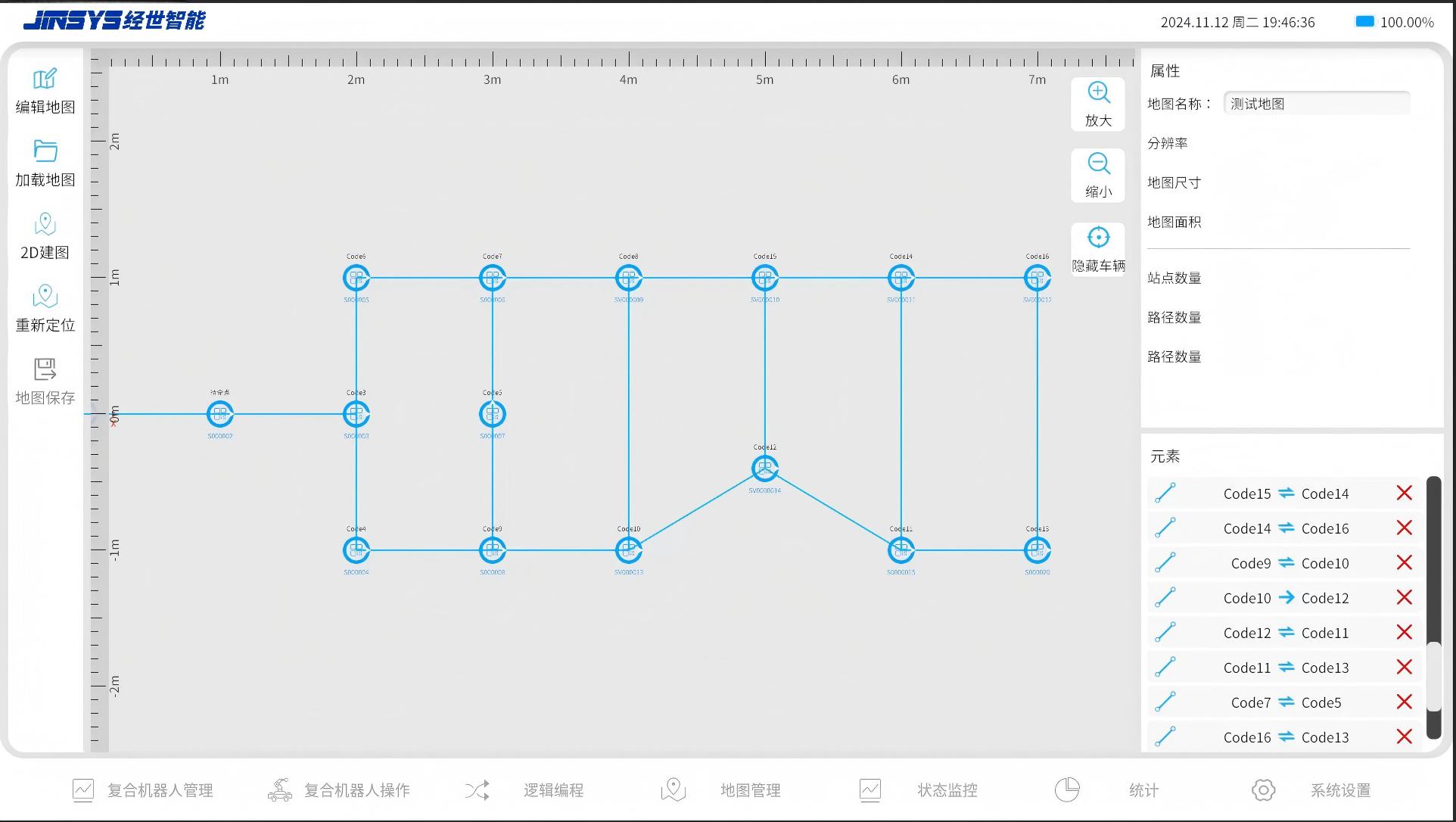
    TCS — Route Management

    Map tools

    • Edit
    • Load
    • 2D map
    • Relocalize
    • Save
    • Zoom
    • Show / hide robot

    Map properties

    • Name
    • Resolution
    • Dimensions
    • Area
    • Station count
    • Path count

    Route elements

    • Stations Code5–Code16
    • One-way connection: Code10 → Code12
    • Bidirectional connections between stations
    View original interfaceTCS — Route Management — original product interface
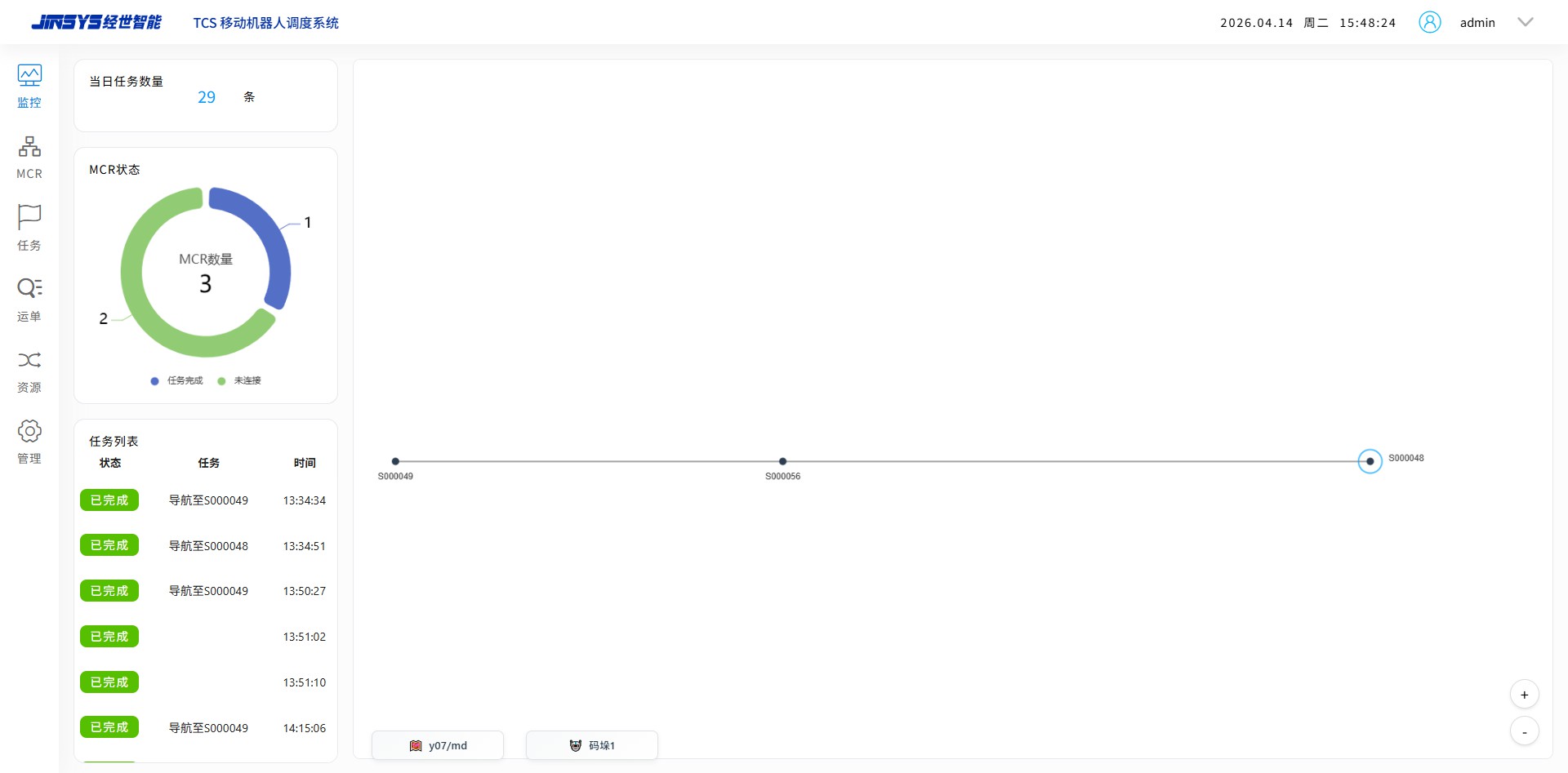
  • TCS — Live Map Monitoring

    Today

    • Tasks: 29
    • Robots: 3
    • Task complete: 1 robot
    • Disconnected: 2 robots

    Map route

    • S000049 ↔ S000056 ↔ S000048
    • Robot position
    • Station labels

    Task feed

    • Navigate to S000049
    • Navigate to S000048
    • Completion status
    • Completion time
    View original interfaceTCS — Live Map Monitoring — original product interface

    Map management

    After the robot operating system creates a map, its data is transferred to the scheduling system through an interface.

    Each map has a unique identifier and can be assigned to multiple robots.

  • Exception management

    Display and handle warnings and errors from the current interface.

    Display errors from the backend scheduling service.

    Display mobile manipulator errors and alarms.
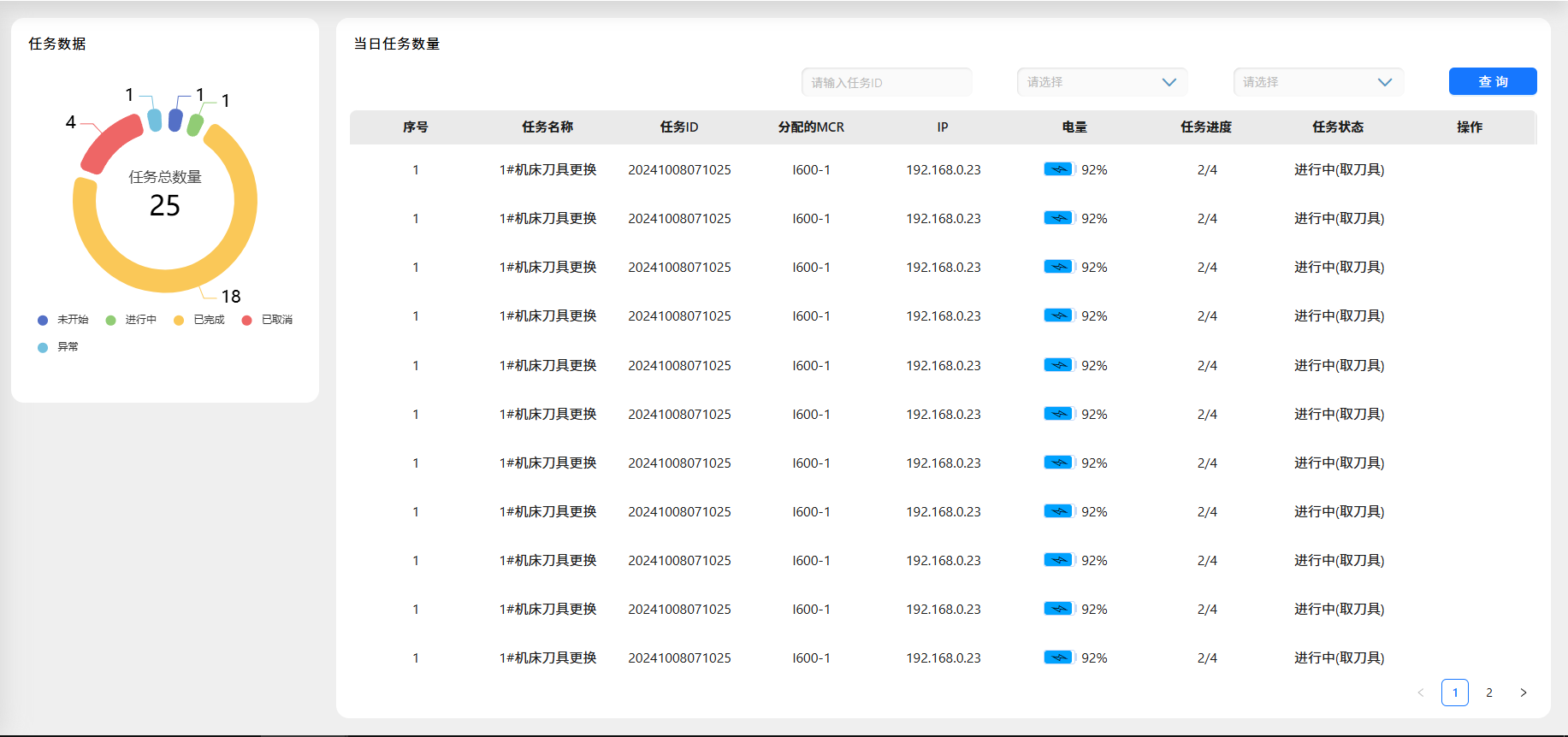
    TCS — Task Management

    Task totals

    • All: 25
    • Not started: 1
    • In progress: 1
    • Completed: 18
    • Cancelled: 4
    • Exception: 1

    Task fields

    • Number
    • Task name
    • Task ID
    • Assigned MCR
    • IP address
    • Battery
    • Progress
    • Status
    • Actions

    Example task

    • Machine 1 tool change
    • ID: 20241008071025
    • Robot: I600-1
    • Battery: 92%
    • Progress: 2 / 4
    • In progress: pick tool
    View original interfaceTCS — Task Management — original product interface
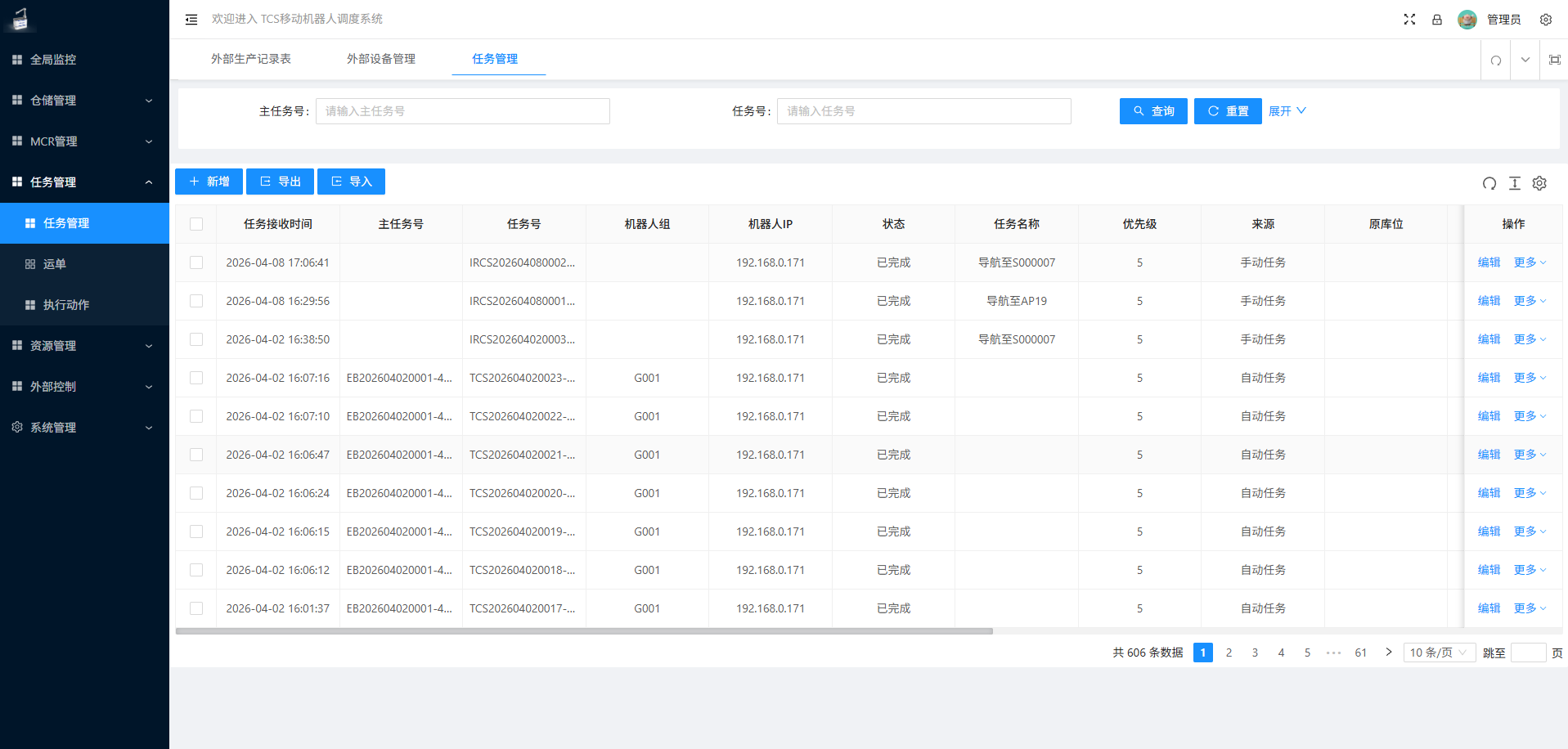
  • TCS — Business Task Records

    Find and manage tasks

    • Parent task ID
    • Task ID
    • Search
    • Add
    • Export
    • Import

    Record fields

    • Received at
    • Parent task
    • Task
    • Robot group
    • Robot IP
    • Status
    • Name
    • Priority
    • Source
    • Origin
    • Actions

    Examples

    • Navigate to S000007
    • Navigate to AP19
    • Completed
    • Priority: 5
    • Manual / automatic
    • 606 records

    Workspace

    • Global monitoring
    • Warehouse
    • MCR
    • Tasks / waybills / actions
    • Resources
    • External control
    • System
    View original interfaceTCS — Business Task Records — original product interface

    Task management

    Connect to upstream WMS, MES and central control systems through APIs.

    System tasks include navigation, arm actions and Master programs.

    Navigation tasks move the mobile manipulator to a specified location.

    Arm actions perform specific work tasks.

    Master programs execute the robot operating system's programmed logic.

  • Transport order management

    The transport order list shows order numbers, assigned mobile manipulators, order details, task types, task status and start times.
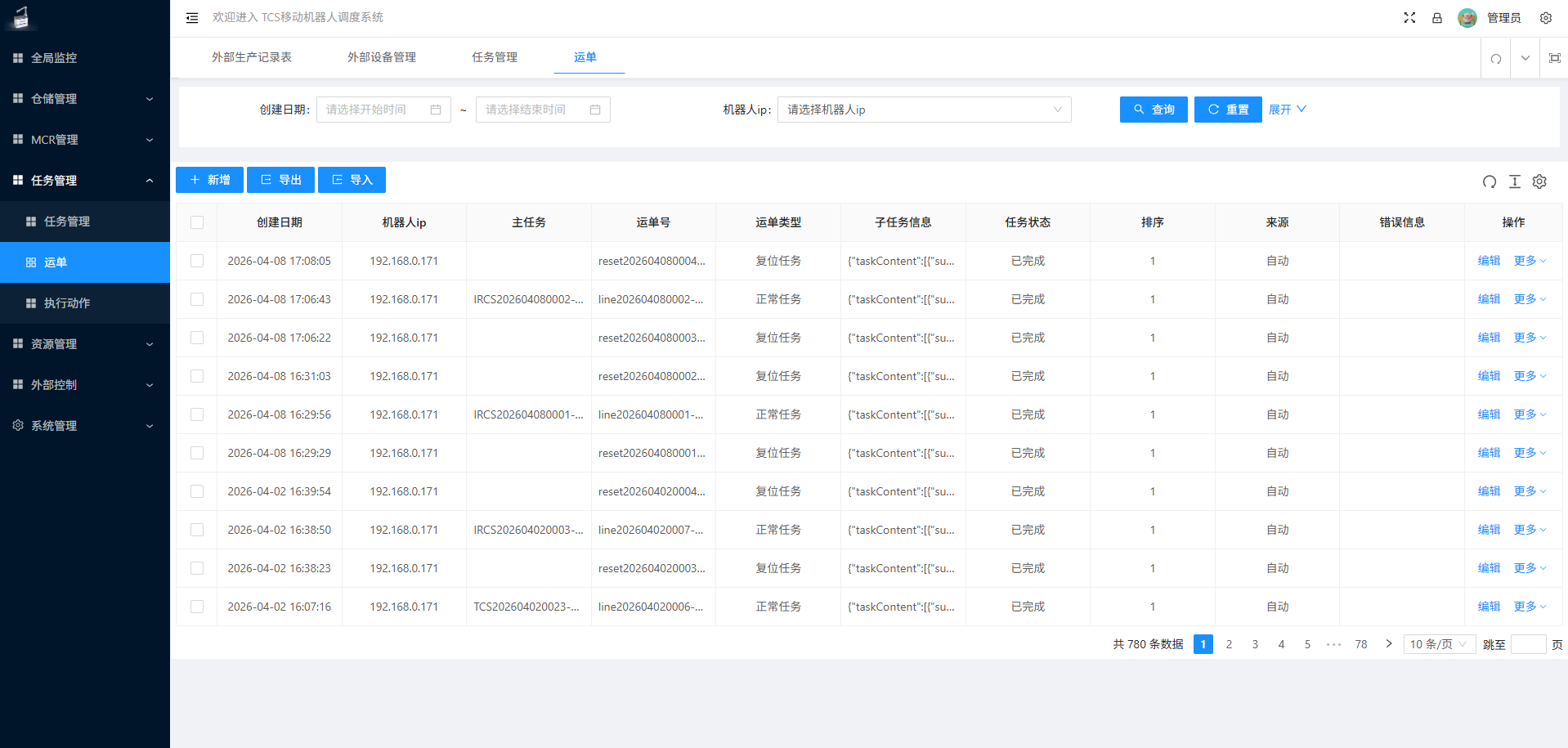

    TCS — Waybill Records

    Find and manage waybills

    • Start / end date
    • Robot IP
    • Search
    • Add
    • Export
    • Import

    Record fields

    • Created at
    • Robot IP
    • Parent task
    • Waybill ID
    • Type
    • Subtask information
    • Status
    • Sequence
    • Source
    • Error
    • Actions

    Examples

    • Reset task
    • Normal task
    • Completed
    • Sequence: 1
    • Automatic
    • 780 records
    View original interfaceTCS — Waybill Records — original product interface

Business Request Management System

  • Upstream system integration

    Connect to upstream WMS, MES and other systems through APIs, supporting both initiated and received communications.
  • Downstream equipment integration

    Exchange data with elevators, automatic doors and production equipment. Communicate with PLCs over Ethernet using Modbus TCP.
  • Robot management

    The interface includes robot operation controls and an information list, with options to acquire or release control over robot behavior and status.
  • Transport order management

    The transport order list includes all completed and active orders, showing order IDs, robot status, start times and elapsed time.
  • Logging

    Record all actions performed by the account, API calls to upstream management systems and communication with downstream equipment.

  • JINSYS user management

    User management

    Add, edit and remove system user identities, roles and permissions.
  • JINSYS operation monitoring

    Operation monitoring

    Monitor robot routes and stations, operating status, activity and resource usage.