
Products
MES Manufacturing Execution System
Digital management of manufacturing processes, including production scheduling, operations and equipment.
Talk to an expertFind and create orders
- Order number
- Product number
- Search
- Reset
- Add
- Sync ERP
Order fields
- Product name
- Quantity
- Status
- Unit price
- Total
- Customer
- Priority
- Order date
- Delivery date
- Actions
Example order
- JSZP.01 — Copper bar
- Quantity: 3
- Unit price: 10
- Total: 30
- In production
Manage progress
- Unprocessed
- In production
- Complete
- Normal / priority
- FANUC M-410iB, ABB1200, CA6136 and CK6150 products
MES Manufacturing Execution System
The JINSYS Manufacturing Execution System (MES) is a production information management system developed for the shop-floor execution layer of discrete manufacturers. Modules cover production scheduling, master data, workshop planning, costs, materials and product quality, forming a reliable, comprehensive and practical platform for collaborative manufacturing management.
Core functions
Production scheduling management
Manage the plan–do–check–act (PDCA) cycle for production plans issued by ERP systems.
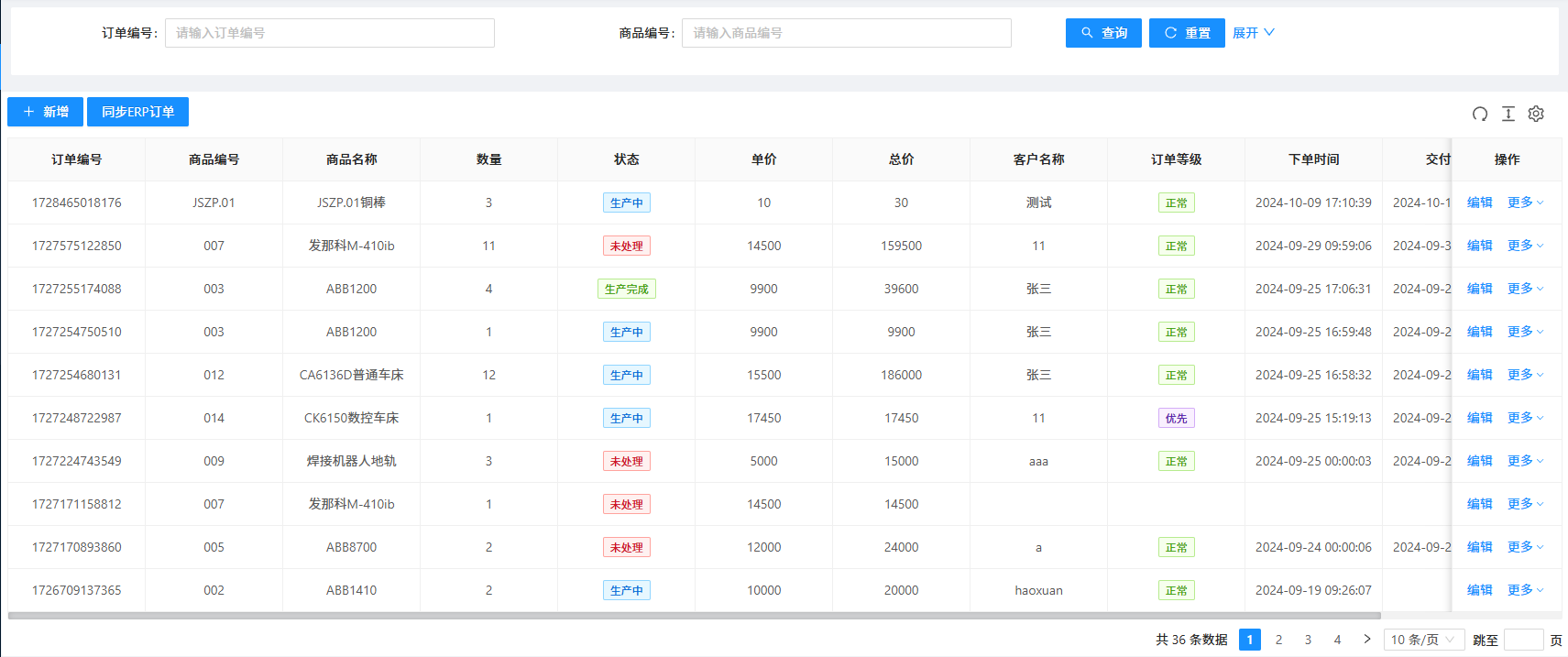
MES — Order Management Find and create orders
- Order number
- Product number
- Search
- Reset
- Add
- Sync ERP
Order fields
- Product name
- Quantity
- Status
- Unit price
- Total
- Customer
- Priority
- Order date
- Delivery date
- Actions
Example order
- JSZP.01 — Copper bar
- Quantity: 3
- Unit price: 10
- Total: 30
- In production
Manage progress
- Unprocessed
- In production
- Complete
- Normal / priority
- FANUC M-410iB, ABB1200, CA6136 and CK6150 products
View original interface
Master data management
Maintain and manage manufacturing data issued by MPM, including product MBOMs, manufacturing processes, factory calendars and personnel information.
Workshop planning management
Break workshop plans into assignments for each section based on work in progress and available resources, and generate material shortage lists from production plans and material records.
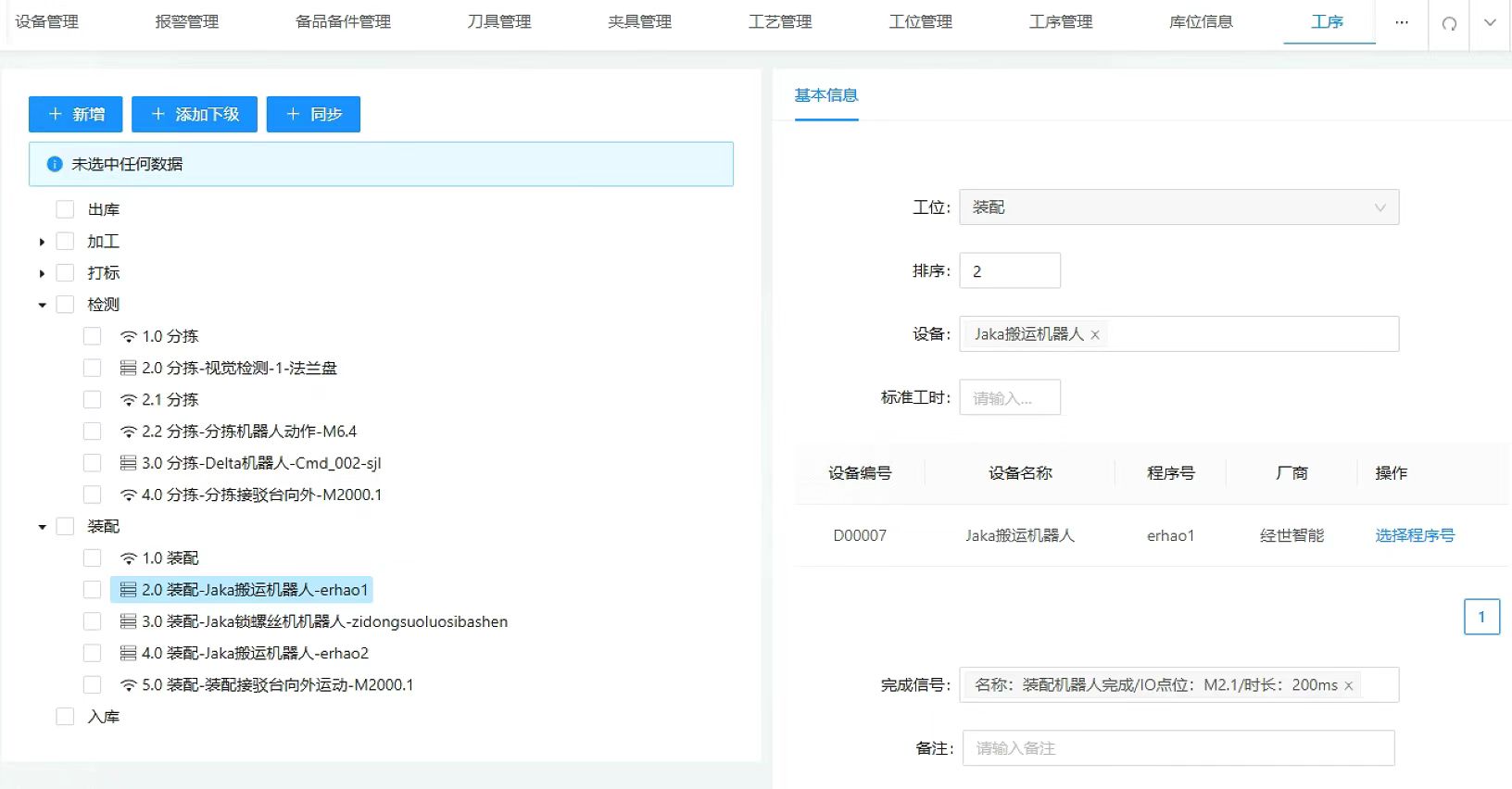
MES — Process Configuration Process sequence
- Retrieval
- Machining
- Marking
- Inspection
- Assembly
- Putaway
Station configuration
- Station: assembly
- Sequence: 2
- Equipment: JAKA handling robot
- Standard time
- Add process / child process
- Sync
Robot program
- Equipment ID: D00007
- Manufacturer: JINSYS
- Program: erhao1
Completion signal
- Assembly robot action complete
- I/O: M2.1
- Duration: 200 ms
- Notes
View original interface
Workshop material management
Manage batch and individual material receipts and issues across blanks, work in progress, finished goods and other shop-floor materials.
Equipment configuration
Configure production equipment online, including equipment IDs, names, manufacturers and purchase dates.
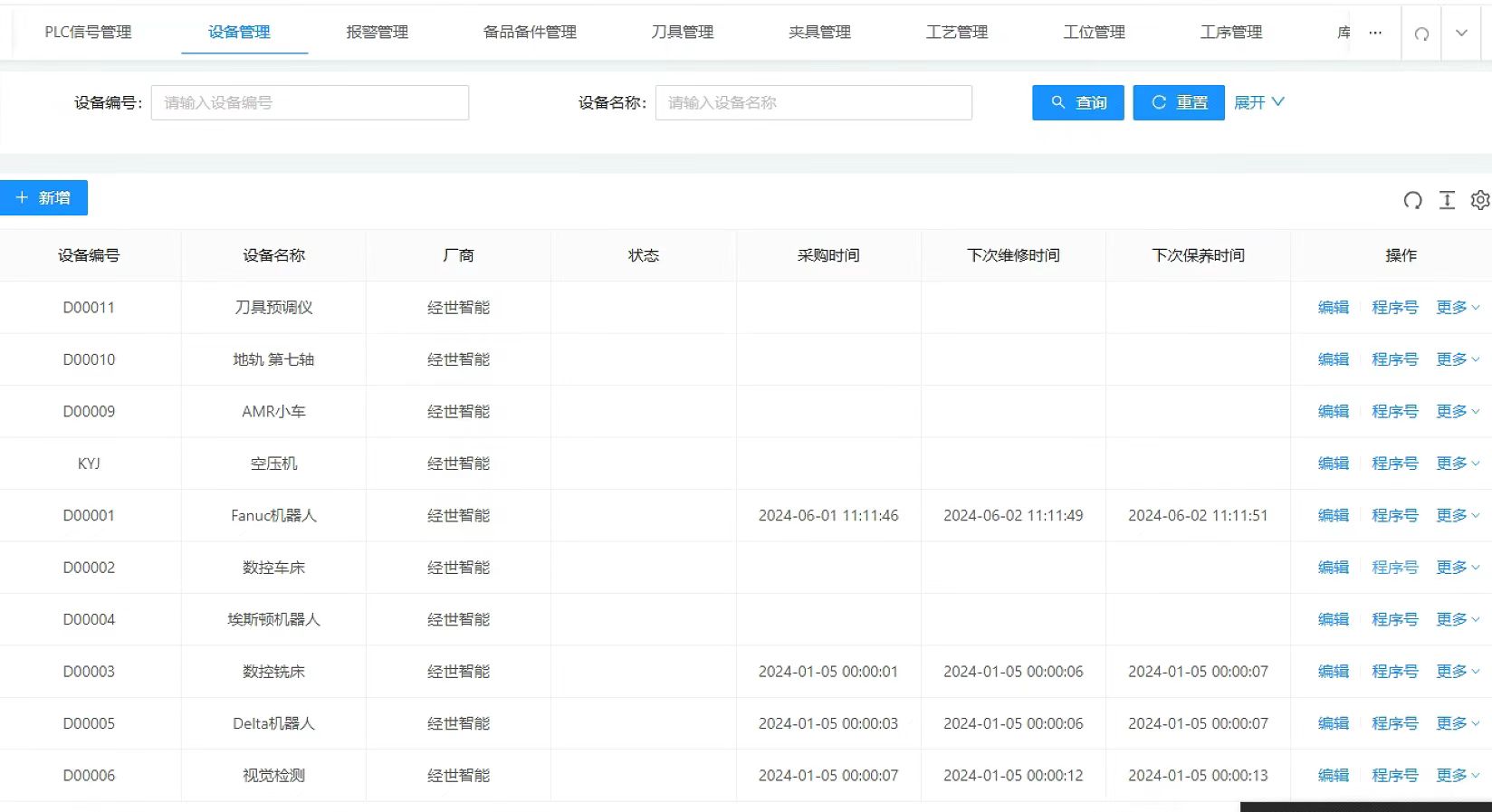
MES — Equipment Management Manage equipment
- Search by ID / name
- Add
- Edit
- Select program
- More actions
Record fields
- Equipment ID
- Name
- Manufacturer
- Status
- Purchase date
- Next repair
- Next maintenance
Equipment examples
- D00011 — Tool presetter
- D00010 — Seventh-axis rail
- D00009 — AMR
- KYJ — Air compressor
- D00001 — FANUC robot
Production equipment
- D00002 — CNC lathe
- D00004 — ESTUN robot
- D00003 — CNC milling machine
- D00005 — Delta robot
- D00006 — Vision system
View original interface
Production equipment management
Read equipment information and collect data from CNC machines, other equipment and manufacturing cells. Monitor operating status, startup and shutdown times and related data in real time.
Fault management
Manage fault dates, names, codes, handling results, solutions and status.
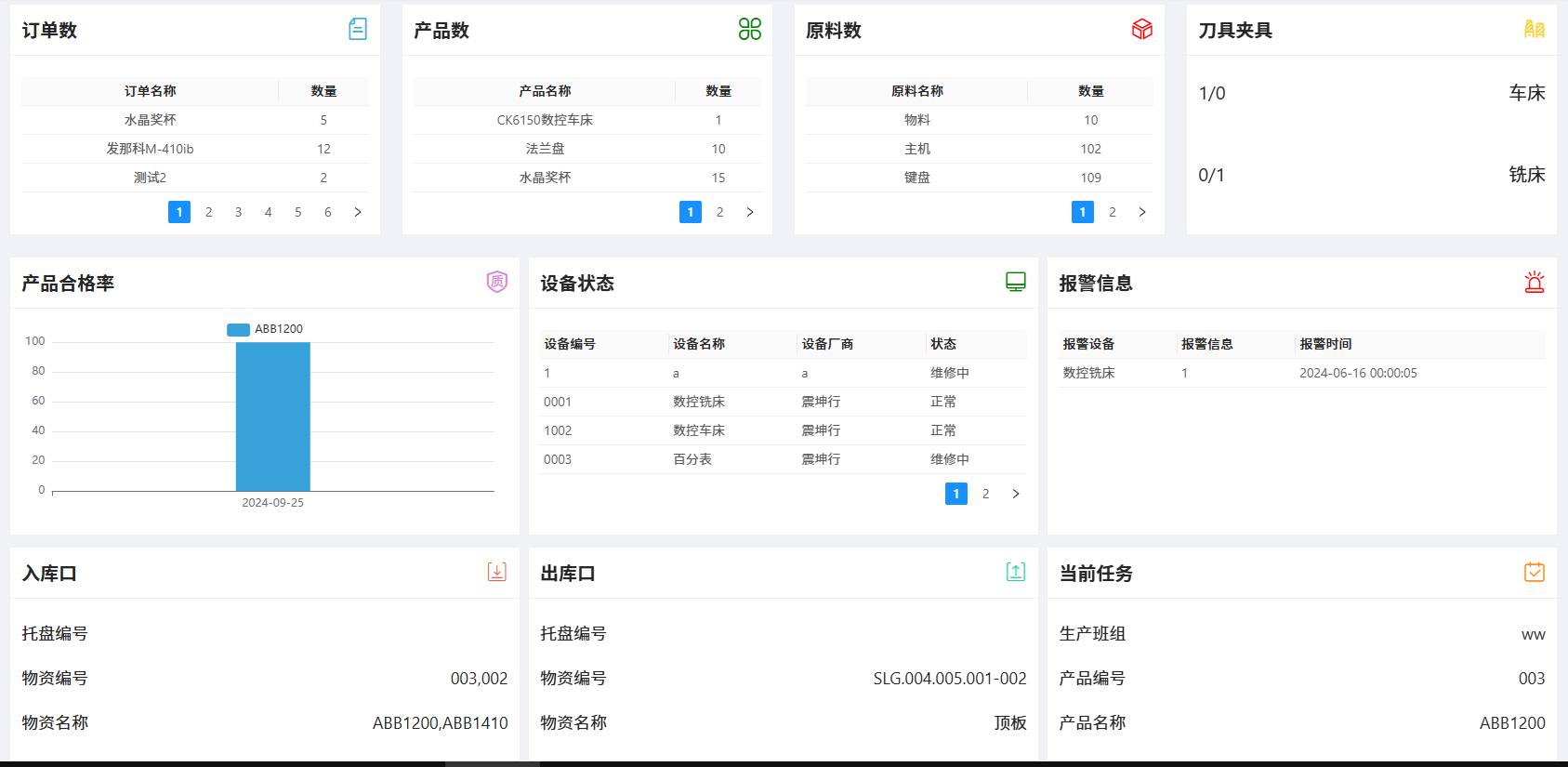
MES — Production Dashboard Orders and products
- Orders: crystal trophy 5 / FANUC M-410iB 12 / Test 2: 2
- Products: CK6150 lathe 1 / flange 10 / crystal trophy 15
Materials and tooling
- Material: 10
- Main unit: 102
- Keyboard: 109
- Lathe tools / fixtures: 1 / 0
- Milling tools / fixtures: 0 / 1
Quality and equipment
- ABB1200 yield chart
- Equipment ID / name / manufacturer / status
- Normal / under maintenance
- CNC milling alarm information
Material flow
- Inbound: pallet and material IDs; ABB1200 / ABB1410
- Outbound: SLG.004.005.001-002 — top plate
- Current task: production team ww / product 003 ABB1200
View original interface
Product management
Create and edit product structures and maintain product IDs, names, descriptions, parts and attributes.
Process operation management
Configure operations according to the product process flow, including execution order, assigned equipment, CN program numbers, completion signals, 2D drawings and process documents.
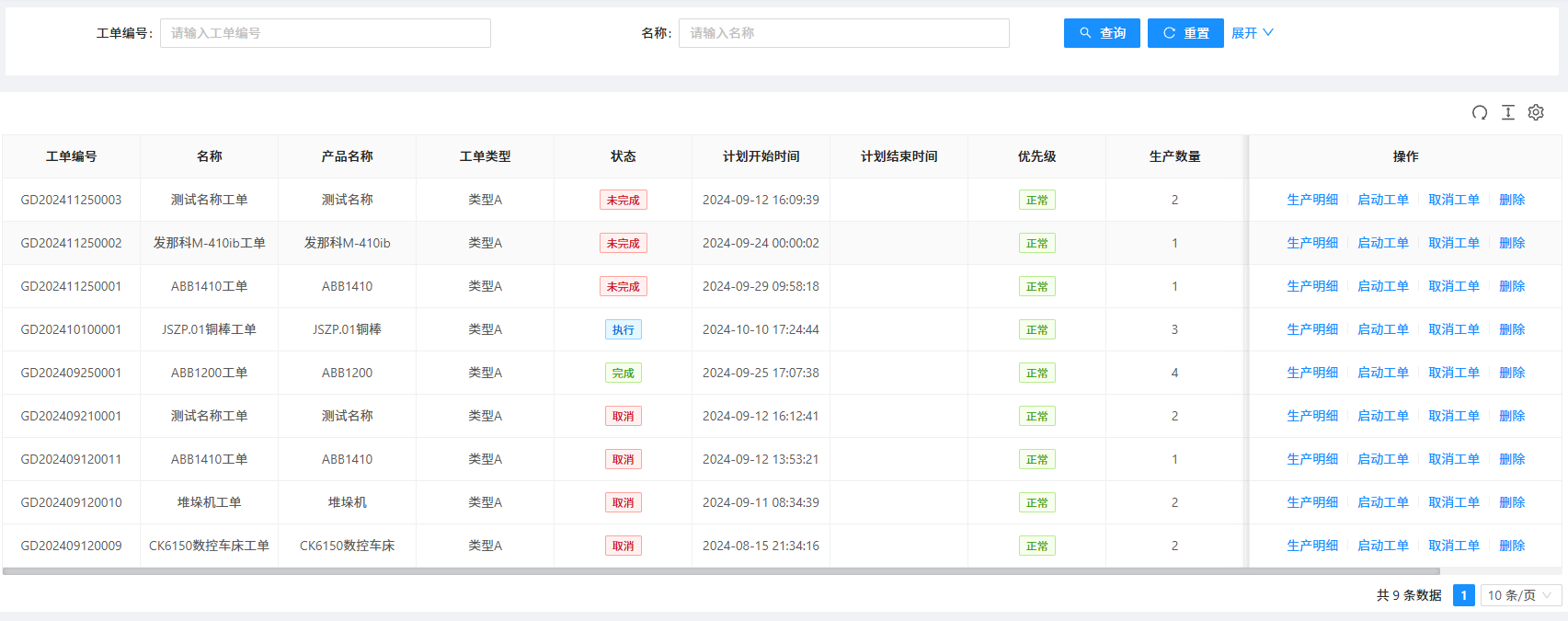
MES — Production Work Orders Find work orders
- Work-order number
- Name
- Search
- Reset
- More filters
Work-order fields
- Product name
- Type
- Status
- Planned start
- Planned end
- Priority
- Production quantity
Examples
- GD202410100001 — JSZP.01 copper bar / in progress / quantity 3
- GD202409250001 — ABB1200 / complete / quantity 4
- FANUC M-410iB, ABB1410, stacker crane and CK6150 CNC-lathe orders
Actions and states
- Production details
- Start
- Cancel
- Delete
- Incomplete / in progress / complete / cancelled
- Normal priority
- 9 records
View original interface
Production plans
Create production plans with products, dates and quantities based on actual demand.
Production tasks
Execute each product's production tasks after its plan is approved.
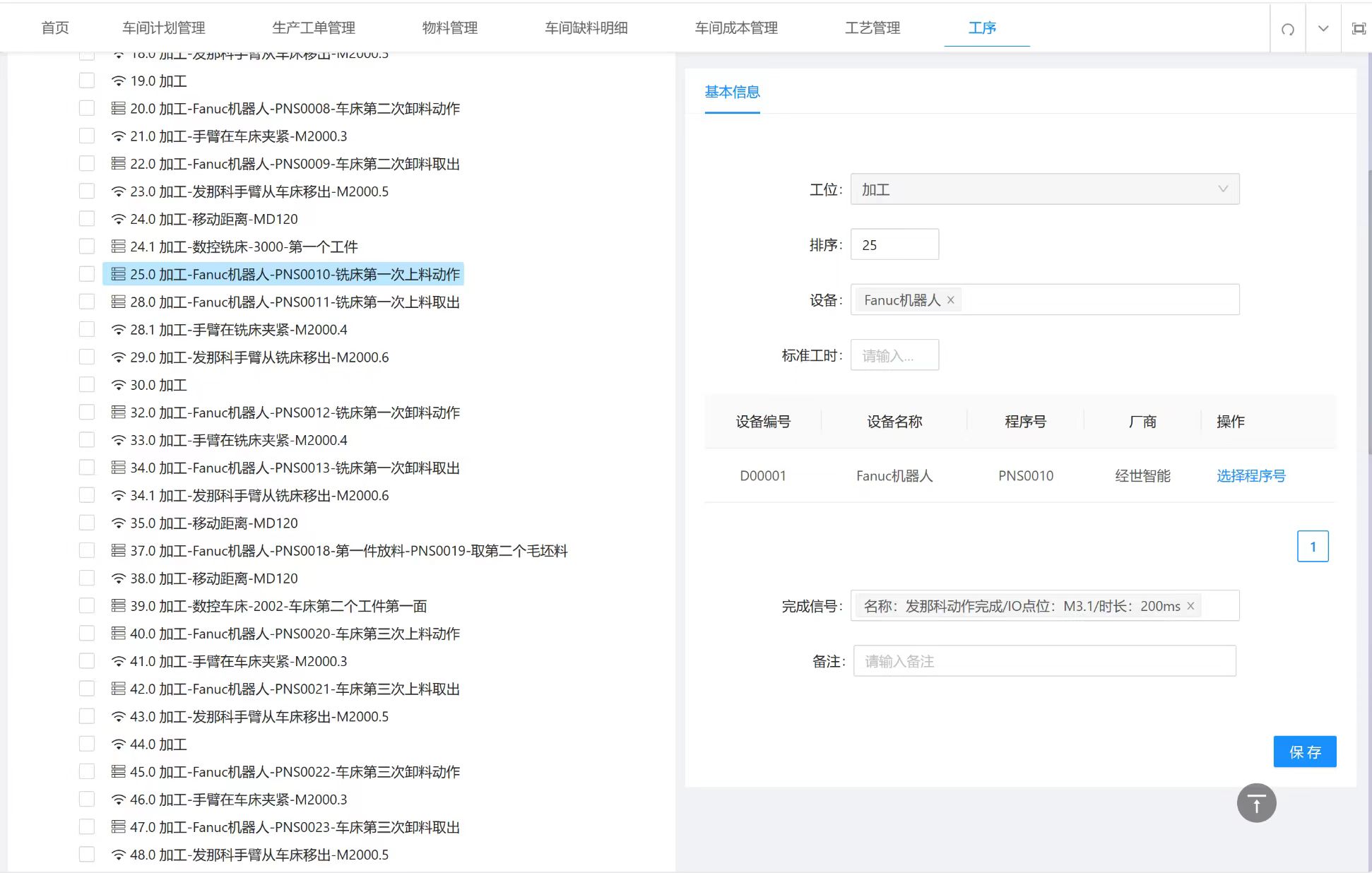
MES — Robot and Machine Process Sequencing Selected operation
- Station: machining
- Sequence: 25
- FANUC robot: first loading action at the milling machine
Program assignment
- Equipment: D00001 — FANUC robot
- Program: PNS0010
- Manufacturer: JINSYS
- Select program
Completion signal
- FANUC action complete
- I/O: M3.1
- Duration: 200 ms
- Save
Coordinated sequence
- Lathe loading and unloading
- Arm clamping signals
- Arm exit signals
- Travel distance: MD120
- Milling-machine loading and unloading
- Blank retrieval
View original interface
Production scheduling
Schedule mobile manipulators for loading and unloading according to product process configurations, set program numbers in CNC systems and start execution.
Product tracking management
Automatically collect production data by product serial number. Track production to systematically gather and organize quality information and analyze and evaluate product quality.
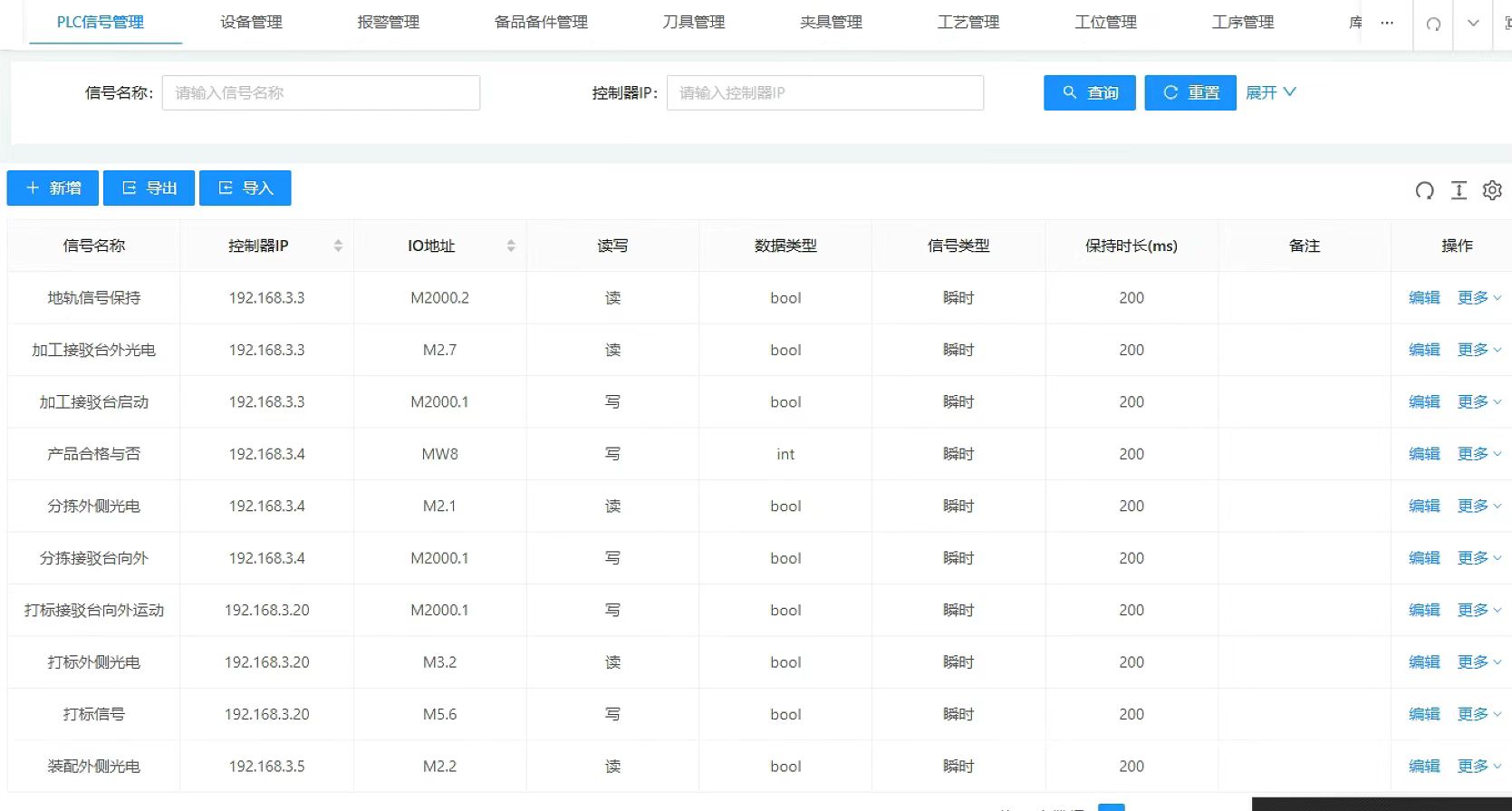
MES — PLC Signal Configuration Manage signals
- Search by signal name / controller IP
- Add
- Export
- Import
- Edit
Signal fields
- Controller IP
- I/O address
- Read / write
- Data type
- Signal type
- Hold duration (ms)
- Notes
Input examples
- Rail hold — M2000.2
- Machining transfer-table photoelectric sensor — M2.7
- Sorting photoelectric sensor — M2.1
- Marking photoelectric sensor — M3.2
- Assembly photoelectric sensor — M2.2
Output examples
- Machining transfer-table start — M2000.1
- Product pass / fail — MW8 (int)
- Sorting and marking transfer-table movement — M2000.1
- Marking signal — M5.6
- Momentary signals: 200 ms; Boolean unless specified
View original interface
Data interfaces
After authenticated WebSocket binding, MES exposes interfaces for data generated during production.