
Products
WMS Warehouse Management System
Connects materials, storage locations, inventory, receiving and dispatch for real-time, transparent and visual warehouse management.
Talk to an expertManage materials
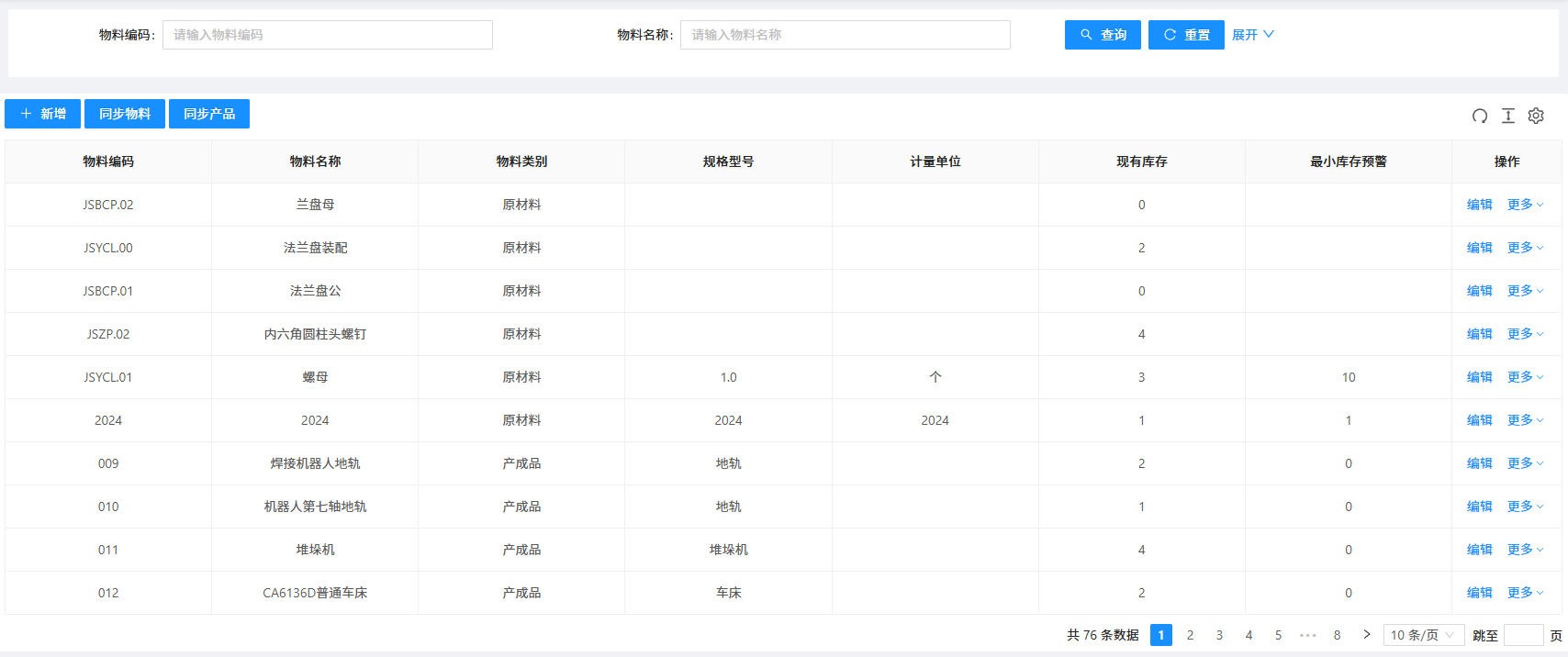
- Search by code / name
- Add
- Sync materials
- Sync products
- Edit
Material fields
- Code
- Name
- Category
- Specification / model
- Unit
- Current stock
- Minimum-stock alert
Raw materials
- Flange components
- Flange assembly
- Socket-head cap screw
- JSYCL.01 — Nut: stock 3 / minimum 10
Products
- Welding-robot rail
- Seventh-axis robot rail
- Stacker crane
- CA6136D conventional lathe
- 76 records
WMS Warehouse Management System
The JINSYS Warehouse Management System (WMS) uses IoT and big data for intelligent warehouse operations, systematic storage management and transparent material preparation. It supports different business types, operating models and multiple warehouses, automatically collecting and analyzing data and connecting upstream and downstream software. Comprehensive information helps managers improve inventory turnover and accuracy and standardize operations through real-time, transparent and visual warehouse management.
Core functions
Manage materials
- Search by code / name
- Add
- Sync materials
- Sync products
- Edit
Material fields
- Code
- Name
- Category
- Specification / model
- Unit
- Current stock
- Minimum-stock alert
Raw materials
- Flange components
- Flange assembly
- Socket-head cap screw
- JSYCL.01 — Nut: stock 3 / minimum 10
Products
- Welding-robot rail
- Seventh-axis robot rail
- Stacker crane
- CA6136D conventional lathe
- 76 records
View original interface
Raw material and finished goods inventory
Digitally manage warehouseraw materials and finished goodswith:
• Material information
• Storage location information
• Inventory alerts
Warehouse workspace
- Master data
- Mold and terminal associations
- Materials
- Warehouse zones
- Storage locations
- Task scheduling
- Inventory
- Inbound / outbound
- System management
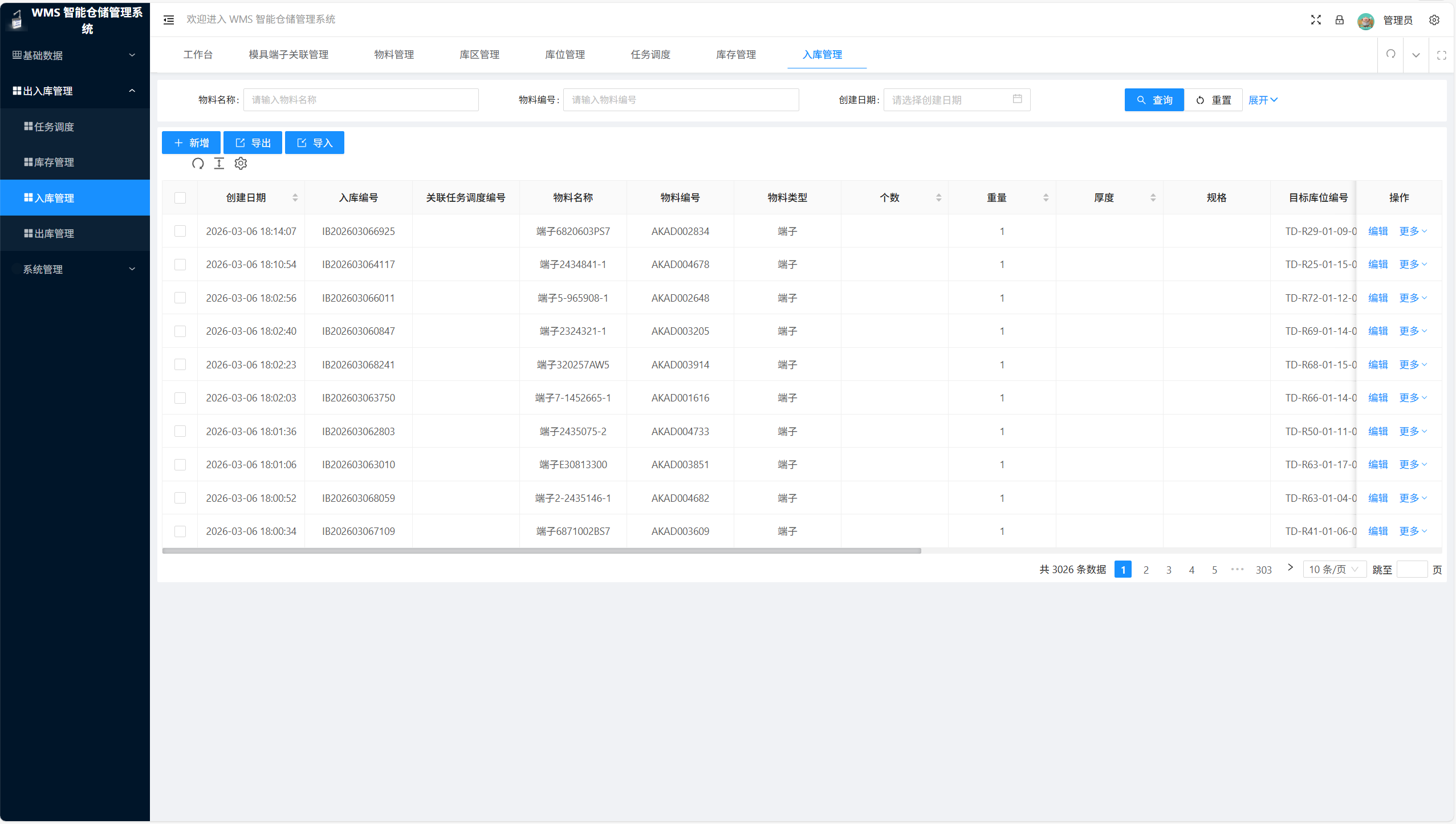
Find and manage receipts
- Material name
- Material code
- Creation date
- Search
- Reset
- Add
- Export
- Import
Receipt fields
- Created at
- Receipt number
- Related scheduling task
- Material name / code / type
- Quantity
- Weight
- Thickness
- Specification
- Target location
- Actions
Example receipt
- 2026-03-06 18:14:07
- IB202603066925
- Terminal 6820603PS7
- Material: AKAD002834
- Weight: 1
- 3,026 records
View original interface
Inbound and outbound management
Manage receiving and dispatch processes for raw materials, work in progress and finished goods:
• Dual operating modes: manual or synchronized receiving and dispatch
• Transaction list management: view inbound and outbound records for raw materials, work in progress and finished goods
Manage locations
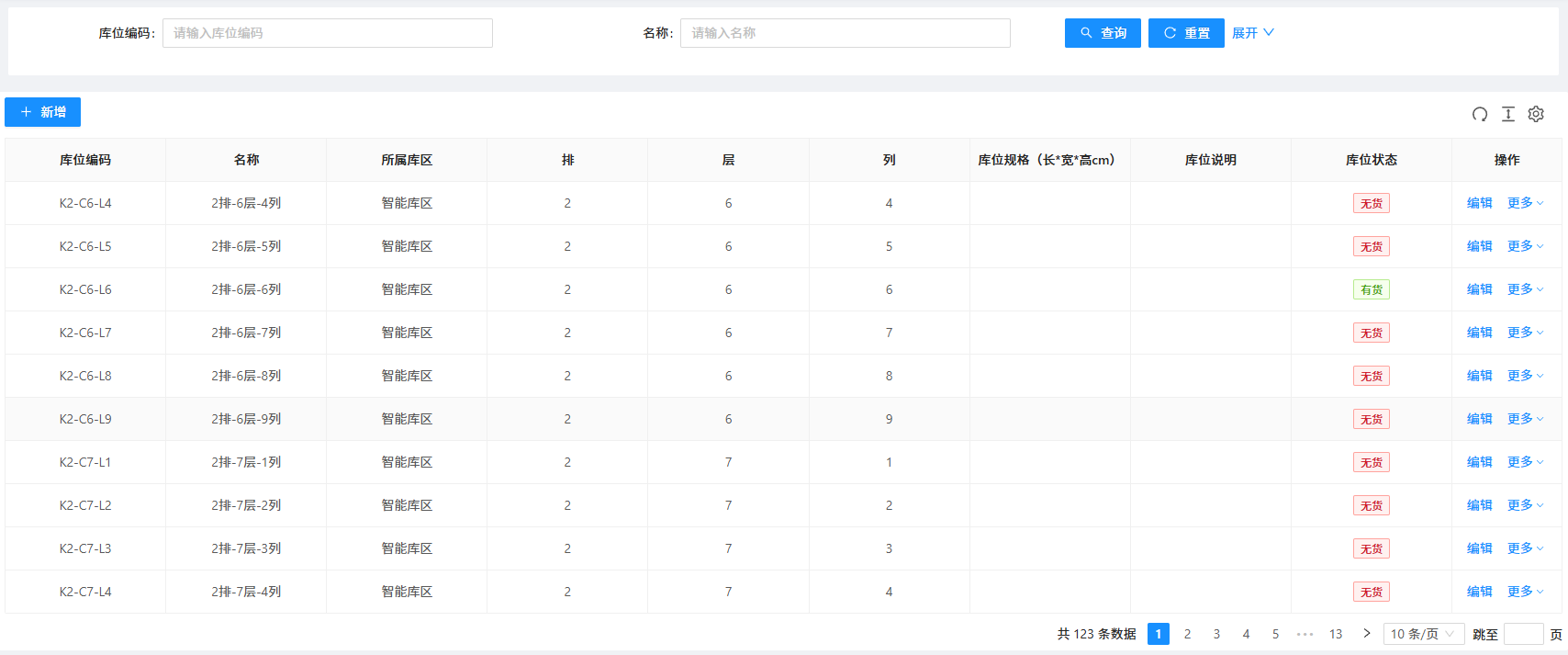
- Search by code / name
- Add
- Edit
- More actions
Location fields
- Code
- Name
- Warehouse zone
- Row
- Level
- Column
- Dimensions: L × W × H (cm)
- Description
- Status
Example location
- K2-C6-L6
- Smart warehouse zone
- Row: 2
- Level: 6
- Column: 6
- Occupied
Inventory status
- Occupied / empty
- 123 locations
- 10 records per page
View original interface
Intelligent reporting
Analyze data across multiple dimensions:
• Dynamic dashboards: real-time warehouse capacity statistics
• Custom reports: comparison across reporting periods
• Consolidated reports: information for the entire warehouse